
Your Solar Panels Are Installed. Now What?
The workers have left. The panels are catching the sun, the inverter is humming, and electricity is quietly making its way into your home.
Today is day one of your free power.
But your solar journey doesn’t end when the installation team packs up. There’s still plenty to keep an eye on – from how much electricity your system generates to the cleanliness of your panels, the health of your inverter, and what happens when something goes wrong.
A little attention now can help your system perform reliably for years to come. Here’s how to look after your solar investment once the installation is complete.
Once the installation is complete, don’t simply accept the keys and wait for your next electricity bill. Take time to understand what has been installed, how it works, and what you need to do if you encounter a problem.
Your installer should walk you through the system and provide the essential documents before closing the project.
What You Should Receive at Handover
|
Item |
Why it matters |
|
Solar plant layout |
Confirms what has been installed and where |
|
Inverter details |
Helps with monitoring and troubleshooting |
|
Panel and equipment warranties |
Establishes what is covered |
|
Monitoring app access |
Lets you track generation and alerts |
|
Net meter details |
Helps you verify your electricity account |
|
User manuals / Dos and Don’ts |
Provides operating and safety guidance |
|
Service contact details |
Tells you whom to contact for support |
Also ask your installer to show you the location of the inverter, isolation switches, protection equipment, and meter. You don’t need to handle electrical components yourself (in fact, you shouldn’t!). But you should know where they are, what they do, and which parts require professional assistance.
Your solar panels may be working silently on the roof, but you shouldn’t have to wait until the next electricity bill to find out whether they’re performing properly.
Your installer should provide access to a monitoring app or inverter display. This is your first tool for understanding how much electricity your system is generating and identifying unusual changes.
The Numbers You Should Know
|
What to check |
What it tells you |
|
Daily generation |
How many units your system produced today |
|
Monthly generation |
How much electricity it generated this month |
|
Current power output |
How much electricity it is producing right now |
|
System alerts |
Whether the inverter has detected a problem |
|
Grid export |
How much surplus electricity is being sent to the grid, where applicable |
Generation will naturally vary with sunlight, weather, season, shading, and household conditions. A cloudy day doesn’t necessarily indicate a fault. What matters is identifying a sustained or unexplained drop in generation. For example, if your system produced similar amounts of electricity over several sunny days but suddenly generates very little, check the monitoring app for alerts and contact your installer if the issue persists.
Going solar doesn’t automatically mean your electricity bill will become zero. Your bill depends on how much electricity your home consumes, how much your solar system generates, and how your DISCOM accounts for electricity imported from and exported to the grid. It also includes applicable tariffs, surcharges, and the settlement rules followed by your DISCOM.
Understanding this process will help you identify billing errors and avoid confusing a higher bill with a system failure.
What to Check on Your First Bills
After commissioning and net-meter installation, check:
Your electricity bill is not just a payment document. It is one of the ways you can check whether your solar system and grid connection are working together as expected.
Solar panels are designed to work outdoors for years, but they are still exposed to dust, pollution, bird droppings, rain, and extreme weather. Looking after your system involves more than cleaning the panels. You also need to pay attention to the inverter, wiring, mounting structures, and the area around the equipment.
The goal isn’t to inspect every component yourself. It’s to notice visible changes, follow the recommended maintenance schedule, and arrange professional checks when needed.
How Often Should You Clean Your Panels?
We recommend that you clean your panels at least once a month and, at the very least, once a quarter, as it can affect your power generation. Your location, roof conditions, pollution levels, and bird activity all make a difference. You may need more frequent cleaning if your home is:
Use clean water and a soft, non-abrasive cleaning method recommended by your installer. Avoid harsh chemicals, abrasive brushes, and aggressive scrubbing. Never put yourself at risk to clean a rooftop. If the panels are difficult to access, arrange professional cleaning instead of climbing onto a slippery or elevated roof. Always switch off the system before cleaning it!
The panels may be the most visible part of your solar system, but the inverter plays a critical role. It converts the electricity generated by your panels into electricity your home can use and, where applicable, export to the grid.
Most inverters come with apps, so be sure to download them and remotely monitor your generation and alerts. If there’s an issue, you must ask your EPC provider for help.
What Can You Check Safely?
You can carry out simple visual checks without opening the equipment:
Maintenance guidance recommends keeping inverters dry and ventilated and periodically checking associated cables, breakers, and protection equipment.
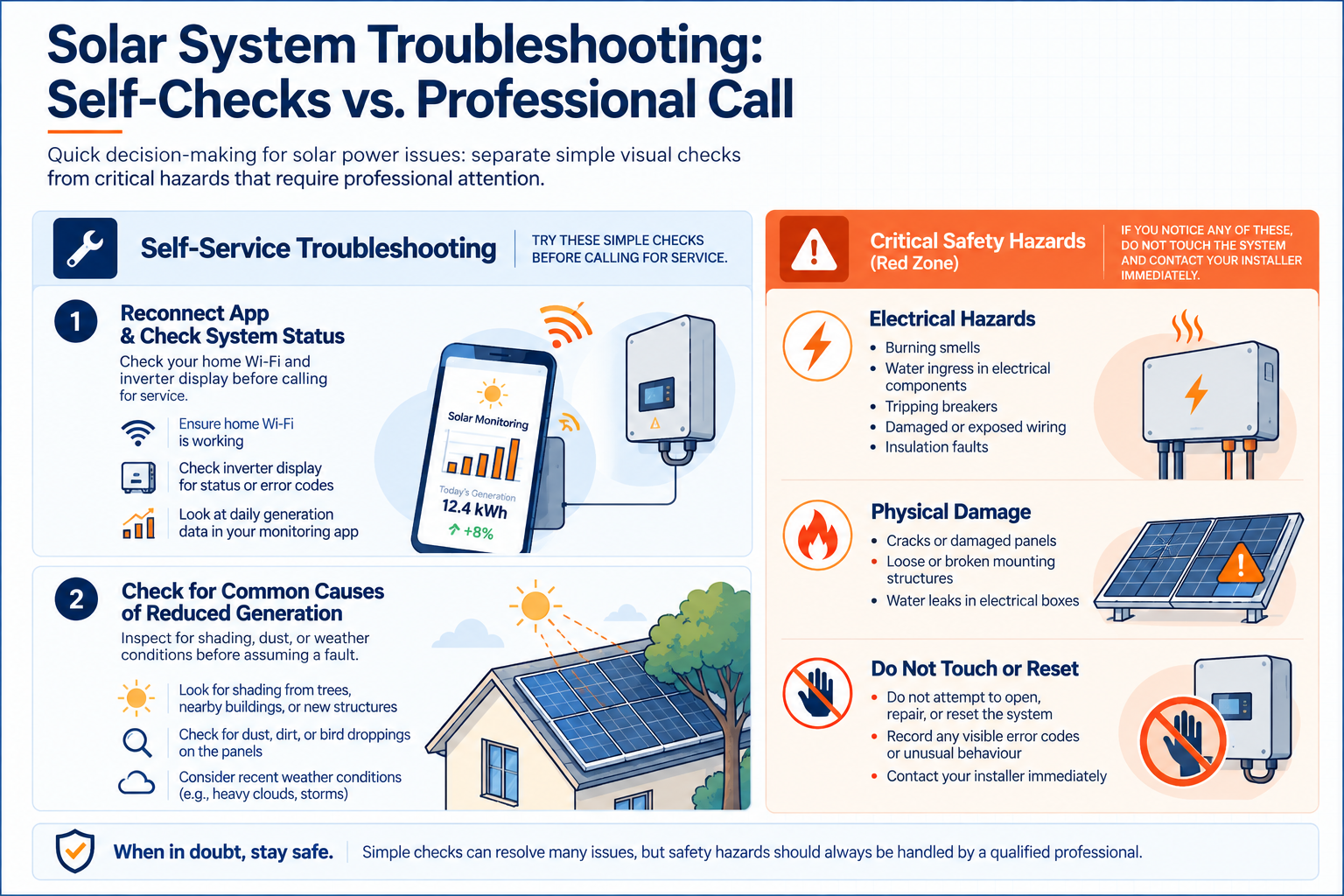
If you notice a burning smell, unusual sounds, visible damage, or repeated shutdowns, don’t attempt to fix the issue yourself. Contact your installer or a qualified technician.
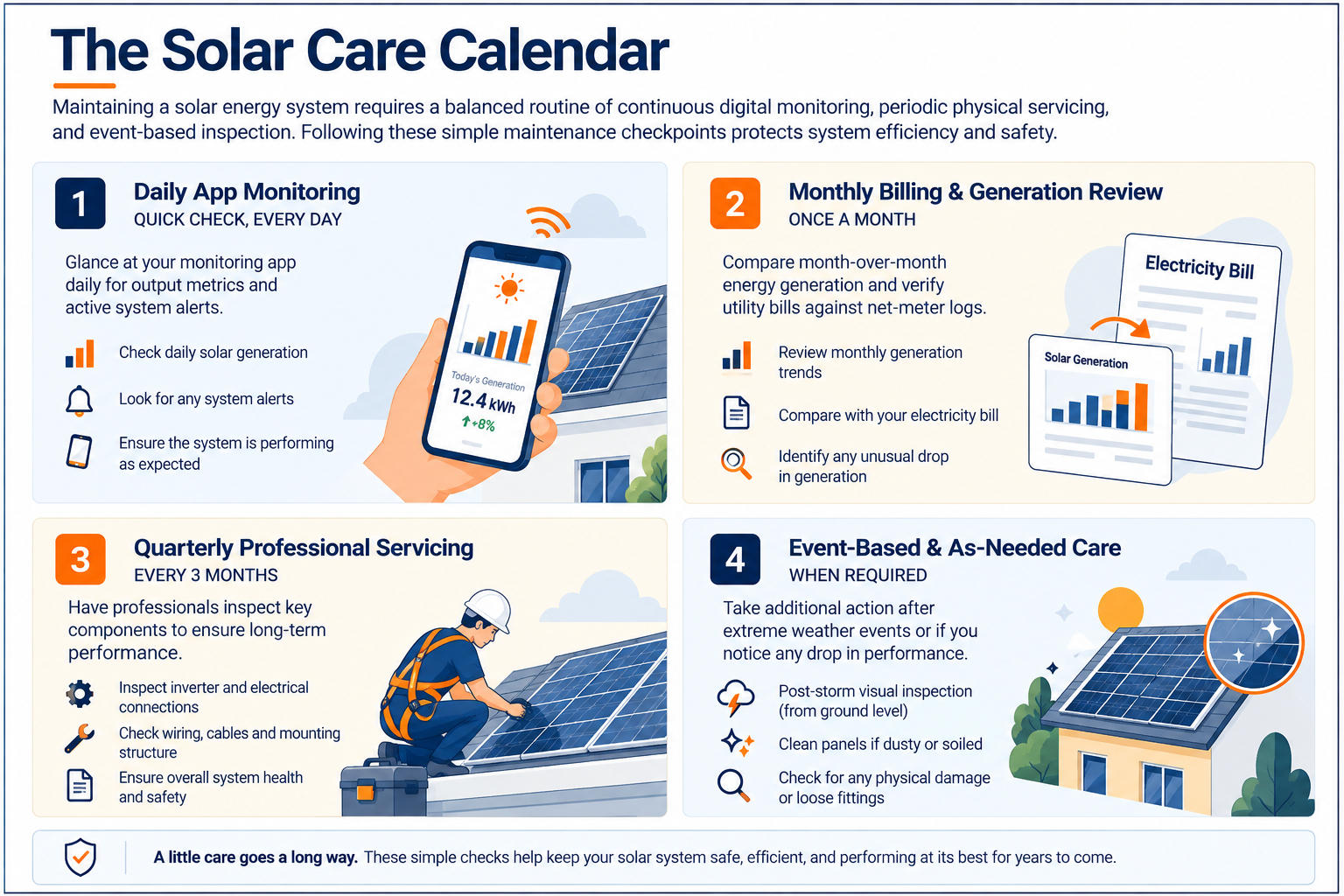
The frequency of checks will depend on your system, roof conditions, equipment manufacturer’s guidance, and the support arrangement with your installer.
A Homeowner’s Solar Checklist
|
Frequency |
What to do |
|
Regularly |
Check the monitoring app for unusual changes or alerts |
|
Monthly |
Review generation and compare it with previous months |
|
As needed or monthly |
Clean panels based on dust, pollution, and local conditions |
|
Periodically |
Look for visible damage, new shading, and blocked ventilation |
|
After severe weather |
Arrange a professional inspection if damage is suspected |
|
As recommended / every 3 months |
Schedule servicing and electrical checks |
Also keep an eye on changes around your system. A growing tree, nearby construction, roof repairs, or objects placed near the inverter can affect performance or access.
The best solar care routine is simple: monitor performance, notice changes, follow safety precautions, and get professional help when you need it.
Contact Your EPC vendor or Installer If You Notice:
Avoid touching damaged equipment or attempting to reset electrical components without professional guidance.
Some homeowners choose an annual maintenance contract (AMC) for routine inspections and servicing. Others prefer to contact their installer only when a problem occurs. The important thing is to know what support you have (whether your AMC coverage is basic or comprehensive) and what you will be charged for.
Questions to Ask Before Signing an AMC
|
Question |
Why it matters |
|
How many inspections are included? |
Clarifies the service frequency |
|
Is panel cleaning included? |
Prevents unexpected cleaning charges |
|
Are electrical checks included? |
Establishes what preventive work is covered |
|
Are emergency visits included? |
Helps you understand support during breakdowns |
|
Are spare parts covered? |
Separates service costs from replacement costs |
|
Is labour included for warranty repairs? |
Clarifies your potential out-of-pocket expenses |
|
What is the response time? |
Sets expectations when you report a fault |
Read the terms carefully before paying for an additional service package. A contract that covers cleaning may not include inverter repairs, replacement parts, or damage caused by external events.
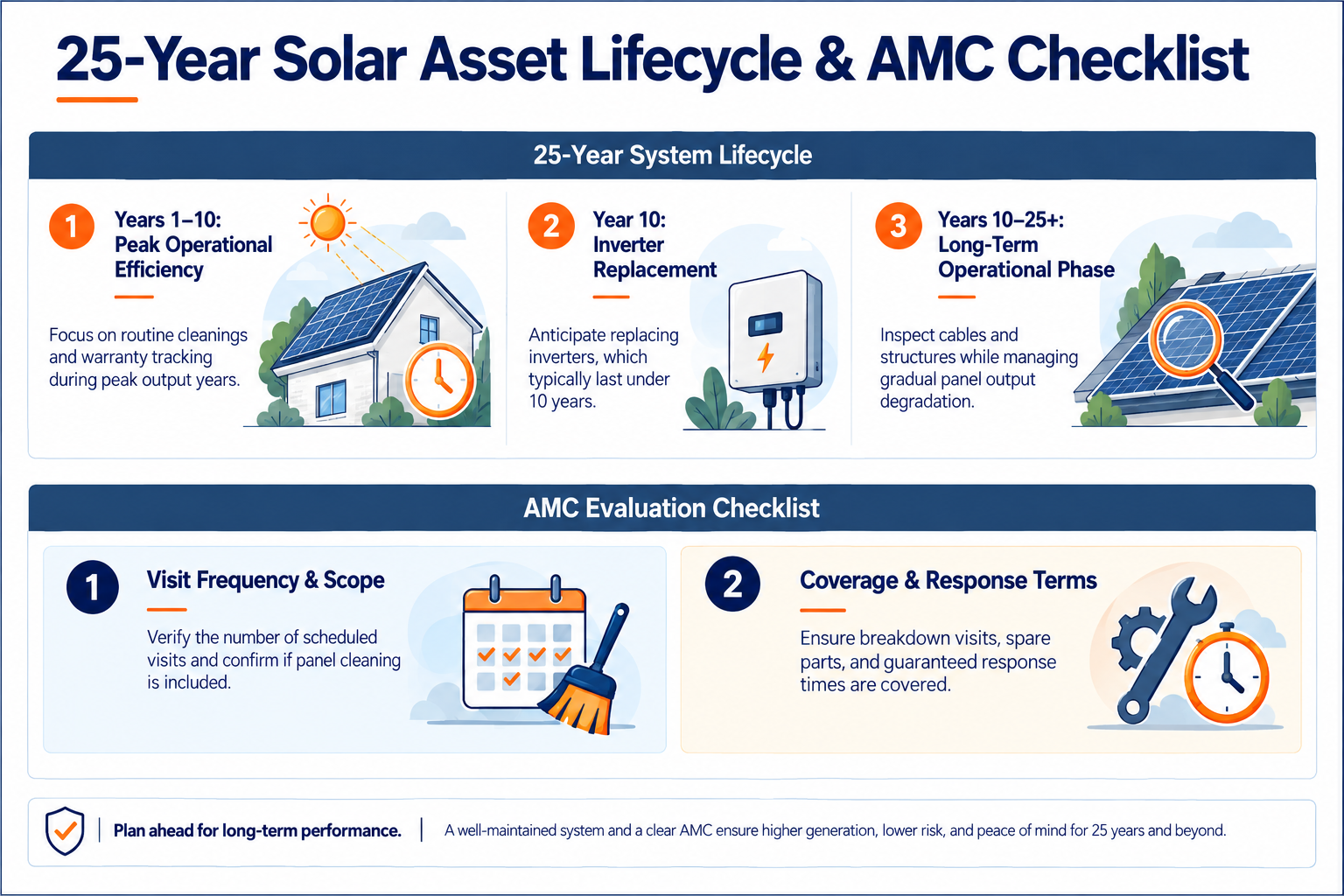
Your solar system is expected to work for many years, but its performance and costs will change over time. Panels may gradually lose output, the inverter may need replacement, and components may require servicing. Planning for these possibilities helps you avoid treating every future expense as an unexpected failure.
Keep These Long-Term Considerations in Mind
The system you install today may need to adapt to changes in your household over the years. Keep its documentation accessible, maintain a record of service work, and review its performance periodically.
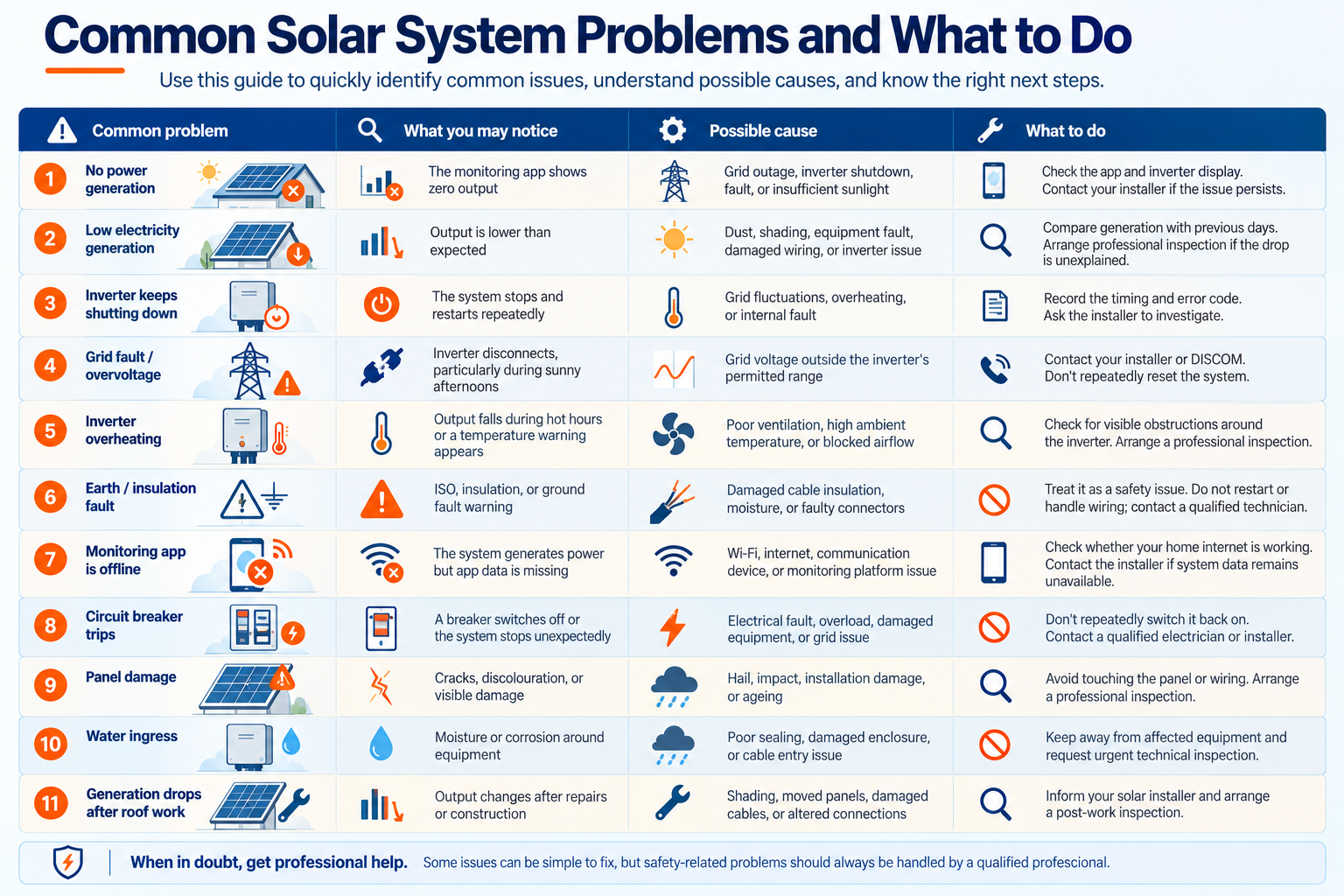
Most solar system problems don’t require homeowners to diagnose or repair equipment themselves. What matters is recognising the warning signs, understanding what might be causing them, and knowing when to contact your installer.
The table below focuses on common issues in residential rooftop solar systems. The same symptoms can have different causes depending on your system, inverter, wiring, and local grid conditions.
Common problem | What you may notice | Possible cause | What to do |
No power generation | The monitoring app shows zero output | Grid outage, inverter shutdown, fault, or insufficient sunlight | Check the app and inverter display. Contact your installer if the issue persists. |
Low electricity generation | Output is lower than expected | Dust, shading, equipment fault, damaged wiring, or inverter issue | Compare generation with previous days. Arrange professional inspection if the drop is unexplained. |
Inverter keeps shutting down | The system stops and restarts repeatedly | Grid fluctuations, overheating, or internal fault | Record the timing and error code. Ask the installer to investigate. |
Grid fault / overvoltage | Inverter disconnects, particularly during sunny afternoons | Grid voltage outside the inverter’s permitted range | Contact your installer or DISCOM. Don’t repeatedly reset the system. |
Inverter overheating | Output falls during hot hours or a temperature warning appears | Poor ventilation, high ambient temperature, or blocked airflow | Check for visible obstructions around the inverter. Arrange a professional inspection. |
Earth / insulation fault | ISO, insulation, or ground fault warning | Damaged cable insulation, moisture, or faulty connectors | Treat it as a safety issue. Do not restart or handle wiring; contact a qualified technician. |
Monitoring app is offline | The system generates power but app data is missing | Wi-Fi, internet, communication device, or monitoring platform issue | Check whether your home internet is working. Contact the installer if system data remains unavailable. |
Circuit breaker trips | A breaker switches off or the system stops unexpectedly | Electrical fault, overload, damaged equipment, or grid issue | Don’t repeatedly switch it back on. Contact a qualified electrician or installer. |
Panel damage | Cracks, discolouration, or visible damage | Hail, impact, installation damage, or ageing | Avoid touching the panel or wiring. Arrange a professional inspection. |
Water ingress | Moisture or corrosion around equipment | Poor sealing, damaged enclosure, or cable entry issue | Keep away from affected equipment and request urgent technical inspection. |
Generation drops after roof work | Output changes after repairs or construction | Shading, moved panels, damaged cables, or altered connections | Inform your solar installer and arrange a post-work inspection. |
There is no universal fault-code system across all inverter brands. The same type of problem may appear under different codes or descriptions, so always refer to your specific inverter’s manual and share the exact code with your installer.
What Homeowners Should Never Do
The golden rule: if the fault involves electricity, heat, damaged equipment, or exposed wiring, don’t experiment. Contact your installer.
Going solar is a long-term decision. Choosing the right system and getting it installed correctly is an important first step, but monitoring its performance, understanding your bills, following safety precautions, and knowing when to call for help are what keep that investment working for you.
You don’t need to become a solar expert. You simply need the right information, a little regular attention, and an installer who stands by the system long after the installation is complete.
Ready to make the most of your rooftop solar system?
At Horizon Renewable Power, we help homeowners understand their solar options, plan the right system, and get support beyond installation.
Get in touch with our team to discuss your solar requirements. Call us at +91 9811121157 | 84482 95965